CORS with .NET and React

Hello, Reader! 🙂, See what I did there? So I was trying to get into React and all that nice component driven front-end. Then I saw something like this when querying my API from React App:
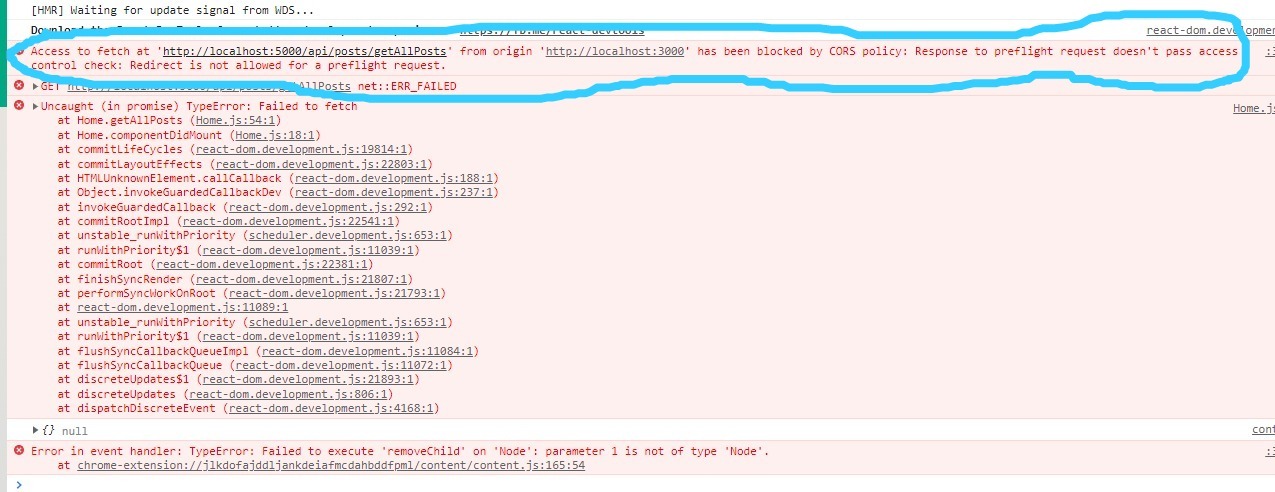
I haven't done a lot of FrontEnd work so this was terrifying but then I decided to visit the knowledge man, Google. I found out a lot about CORS and that inspired this blog post.
Topic:
- What is CORS?
- CORS policies
- Understanding how Http is used in CORS.
- How to Configure CORS in .NET Web APIs?
- Conclusion
What is CORS?
CORS stands for Cross-Origin Resource Sharing. This refers to when we have one origin (domain) requesting resources (css files, json file, html pages, data, etc.) from another origin (domain). There are some restriction to how different origins share content and this is controlled via Http Headers.
So when I read this kind of explanation of CORs I was confused because I had my React app running on my local machine so was my .NET API, so what's up with that?
Well it turns out if we have our React code and .NET API running on the same domain (localhost) but having different port numbers, this is seen as two different origins that, here's a summary of origin equivalence:
http://domain-a:portNumber1vshttp://domain-a:portNumber2- different origin (port is not the same number)http://domain-a:portNumber1vshttp://domain-b:portNumber1- different origin (not the same machine/server)https://domain-a:portNumber1vshttp://domain-b:portNumber1- different scheme (https and http) thus different origins.http://domain-a:portNumber1/path/onevshttp://domain-a:portNumber/path/two- same origin.
From above we can see for origins to be the same the port number, scheme and domain has to be the same. So this is the reason the browser thought my React app (running on http://localhost:3000) was doing a Fetch request from a different origin (my API running on http://localhost:5000).
Let's look at the CORS policies a little more. 🙂
CORS policies
These are policies enforced by the data issuer. This can be the owner of the API. The Policy might be something like allowing all requests from any domain to get data or only allow one domain.
These policies are configured in different ways. In this post we will be looking at how .NET CORE does this.
The client app can be any kind of app: React, Angular, etc.
The idea here is to show how the web api can be configure to issue data with some CORS policies.
Understanding how Http is used in CORS.
The browser uses http headers to enforce CORS policies. Suppose We have to two origins: originA and originB.
Think of originA as your ReactApp and originB as your Web API
originA tries to query data from originB, because this is a cross-origin request the browser will send a preflight to originB.
A Preflight is a http request to a server with headers of the request only. The browser does this to see if originA is allowed to query data from originB. If it is allowed then it gets data, if not then the browser will throw a CORS error.
If the cors header details of originA are the same as those of originB then A is allowed to query B.
How to Configure CORS in .NET Web APIs?
.NET CORE provides a number of ways to configure CORS policies on your Web API. We are going to explore three of them here. These configuration are done in the StartUp.cs thus middleware pipeline. Brace yourself 🙃.
We are gonna discuss three ways .NET CORE makes it possible for us to configure CORS policies. Here is the list:
- Named Policy and Middleware
- Endpoint specific CORS configuration
- Using Attribute.
Named Policy and Middleware
The StartUp.cs has two important methods ConfigureServices(IServiceCollection services) and Configure(IApplicationBuilder app, IWebHostEnvironment env).
- ConfigureServices : This method is responsible for creating services like injecting a service you are going to use in your application
- Configure : This method registers services that your application will use. Creates a middleware pipeline
//In ConfigureServices() method
public void ConfigureServices(IServiceCollection services)
{

  //left out some code for clarity

  //creating a new CORS policy with arbitrary name 'AllowDomain-A'
  services.AddCors(options =>{
    options.AddPolicy("AllowDomain-A",
    builder =>
    {
      builder.WithOrigins("http://domain-a:3000");
      builder.AllowAnyHeader();
      builder.AllowAnyMethod();
    });
  });

  //left out some code for clarity
}

//In Configure() method
public void Configure(IApplicationBuilder app, IWebHostEnvironment env)
{
  if (env.IsDevelopment())
  {
      app.UseDeveloperExceptionPage();
  }
  else
  {
      app.UseExceptionHandler("/Error");
      // The default HSTS value is 30 days. You may want to change this for production scenarios, see https://aka.ms/aspnetcore-hsts.
      app.UseHsts();
  }

  app.UseRouting();
  //usage of created CORS policy.
  app.UseCors("AllowDomain-A");

}
This configuration will allow any request from http:domain-a:3000. In the builder above we specified that our CORS policy (AllowOrigin-A) can allow any Header and Http Method that domain-a will send as part of the Http Request to this Web API.
The app.UseCors() must be before app.UseRouting(). Please refer to Caution note below for more info.
app.UseHttpsRedirection() can make your cors behave weirdly since it redirects http to https and this can potentially restrict a correct request. Better not have this and just throw an exception for an http request that is not secure or specify use the middleware to be used in non-prod environments using the env.IsDevelopment condition check.
The order in which you register your services in Configure method is important. Please checkout this guide for more.
Endpoint specific CORS configuration
This configuration is endpoint specific unlike the first one which was global to the application. This is good if you have want to have different data controls for different endpoints in your API.
The setup is similar we create a policy then use it in Configure method
//In ConfigureServices() method
public void ConfigureServices(IServiceCollection services)
{

  //left out some code for clarity

  //creating a new CORS policy with arbitrary name 'AllowDomain-A'
  services.AddCors(options =>{
    options.AddPolicy("AllowDomain-A",
    builder =>
    {
      builder.WithOrigins("http://domain-a:3000");
      builder.AllowAnyHeader();
      builder.AllowAnyMethod();
    });
  });

  //left out some code for clarity
}

//In Configure() method
public void Configure(IApplicationBuilder app, IWebHostEnvironment env)
{
  if (env.IsDevelopment())
  {
      app.UseDeveloperExceptionPage();
  }
  else
  {
      app.UseExceptionHandler("/Error");
      // The default HSTS value is 30 days. You may want to change this for production scenarios, see https://aka.ms/aspnetcore-hsts.
      app.UseHsts();
  }

  app.UseRouting();
  //enables CORS middleware
  app.UseCors();

  //specify which cors policy to enforce on this specific endpoint.
  app.UseEndpoints(endpoints =>
  {
      endpoints.MapControllerRoute(
          name: "default",
          pattern: "{controller}/{action=Index}/{id?}");
  }).RequiresCors("AllowDomain-A");

}
Notice that we still use app.UseCors() that's because we need to enable our cors policy in middleware pipeline then we use it later in app.UseEndpoints().
This means the endpoint satisfying this pattern will enforce the AllowDomain-A policy.
Using Attribute.
The other way would be using the cors attribute. Which is also more specific. More readable too. The other advantage would be that we can have multiple policies for different action methods in one controller.
The set up is similar we create the policy in ConfigureServices() then call the app.UseCors() in Configure method.
public void ConfigureServices(IServiceCollection services)
{

  //left out some code for clarity

  //creating a new CORS policy with arbitrary name 'AllowDomain-A'
  services.AddCors(options =>{
    options.AddPolicy("AllowDomain-A",
    builder =>
    {
      builder.WithOrigins("http://domain-a:3000");
      builder.AllowAnyHeader();
      builder.AllowAnyMethod();
    });
  });

  services.AddCors(options =>{
    options.AddPolicy("AllowDomain-B",
    builder =>
    {
      builder.WithOrigins("http://domain-b:3000");
      builder.AllowAnyHeader();
      builder.AllowAnyMethod();
    });
  });

  //left out some code for clarity
}

//In Configure() method
public void Configure(IApplicationBuilder app, IWebHostEnvironment env)
{
  if (env.IsDevelopment())
  {
      app.UseDeveloperExceptionPage();
  }
  else
  {
      app.UseExceptionHandler("/Error");
      // The default HSTS value is 30 days. You may want to change this for production scenarios, see https://aka.ms/aspnetcore-hsts.
      app.UseHsts();
  }

  app.UseRouting();
  //enables CORS middleware
  app.UseCors();
}
We now have two policies and we can then have a controller with these action methods:
//Inside some controller

[EnableCors("AllowDomain-A")]
public IAction GetDataForA()
{
  //gets data for domain-a
}

[EnableCors("AllowDomain-B")]
public IAction GetDataForB()
{
  //gets data for domain-b
}
This will make sure that each action method has it's own CORS policy to enforce, isn't that just great! 😎.
Conclusion
CORS is a control feature not a security feature. It doesn't secure your data it just gives you control on how to issue it and who you choose should see it.
This has been a long one! So here's a little summary:
- CORS is cross-origin resource sharing (server doing http request to another server).
- CORS allows you to control which domain sees your data.
- .NET Core has a handful of features to allow you to configure these policies for your API.
This blog has little insight compared to this Microsoft guide, please check it out for more insight.
Until next time, bye. 👋